You can write the perfect README, record a flawless terminal GIF, and polish your API docs for days. But the second a developer has to run brew install or copy a weird curl script just to test your tool, half of them will bounce. People are busy. They do not want to trash their local environment for a test drive.
The best approach is to just show them how it works. For Go developers, WebAssembly (WASM) is the most effective way to do that.
Seeing is Believing
The most direct way to prove your library works is to let someone use it right now in the browser.
For JavaScript developers, this has been the standard for a long time. For systems languages like Go, providing a live demo used to require a backend to execute code safely. That was usually expensive, slow, and hard to secure.
WASM changes that. You can compile your Go code into a binary that runs in the user’s browser. There is no backend, no latency after the first load, and it runs in a safe sandbox.
I ran into this wall recently with FauxRPC. It generates mock data from Protobufs. Explaining that in a README resulted in a lot of blank stares. But letting someone paste their own .proto file into a browser window and immediately see the JSON spit out? That converted them instantly.
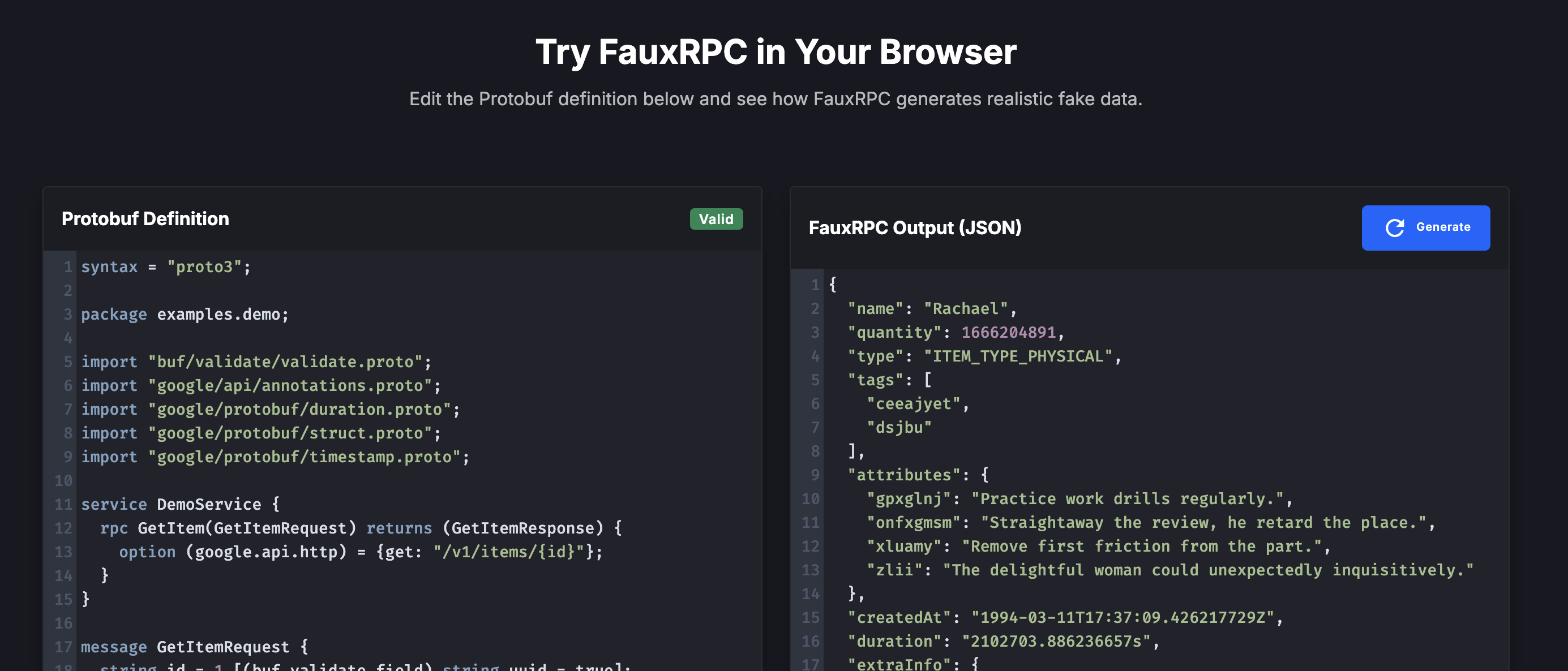
FauxRPC running in the browser via WASM.
Building a WASM Bridge
Bridging Go and the browser’s JavaScript environment mostly comes down to the syscall/js package. You just need to register your function in the global JS scope. It looks something like this:
Go WASM Demo Example (click to expand)View on GitHub
package main

import (
	"fmt"
	"slices"
	"syscall/js"
)

func main() {
	fmt.Println("Go WebAssembly Initialized")

	// Register a function in the global JavaScript scope
	js.Global().Set("processData", js.FuncOf(processData))

	// Keep the program alive so functions remain callable
	select {}
}

func processData(this js.Value, args []js.Value) any {
	if len(args) < 1 {
		return "Error: No input provided"
	}

	input := args[0].String()
	fmt.Printf("Processing input: %s\n", input)

	// In a real demo, this is where you'd call your library.
	// We'll reverse the string as a simple placeholder logic.
	runes := []rune(input)
	slices.Reverse(runes)

	return string(runes)
}
The select {} part is important. It keeps the Go program running indefinitely so your functions stay available to JavaScript. Without it, the program would exit and the bridge would break.
Live Demo
Here is that exact Go code running in your browser. Type something in the box to see the WASM bridge update the output in real time:
Compiling to WASM
Compiling your Go code for the browser is a one-liner. You just need to set the GOOS and GOARCH environment variables:
GOOS=js GOARCH=wasm go build -o demo.wasm ./go/demo/main.go
Loading in the Browser
You will need a glue file called wasm_exec.js to actually load this in the browser. Luckily, Go already ships with it. Just pull it from your installation:
cp "$(go env GOROOT)/misc/wasm/wasm_exec.js" ./static/js/
After that, you can load and run your WASM module with a little bit of JavaScript. Using an input event listener with a debounce makes the interaction feel more natural:
const go = new Go();
WebAssembly.instantiateStreaming(fetch("demo.wasm"), go.importObject).then((result) => {
    go.run(result.instance);

    const input = document.getElementById('my-input');
    input.addEventListener('input', debounce(() => {
        console.log(processData(input.value));
    }, 300));
});
Binary Size
Let’s be honest, Go binaries are notoriously thick. A basic hello-world WASM build sits at around 2MB. Start importing standard libraries like encoding/json or protoreflect, and suddenly you are staring at a 10MB payload.
If you need a smaller binary, you can use TinyGo:
tinygo build -o demo.wasm -target wasm ./go/demo/main.go
For the minimal example we used above, here is the size difference:
| Compiler | Raw Size | Gzipped Size |
|---|---|---|
| Go | 2.5 MB | 758 KB |
| TinyGo | 702 KB | 239 KB |
A 10MB payload isn’t great for a landing page. Even the small example is around a megabyte when gzipped with the standard Go compiler.
Reducing the impact
- TinyGo: It produces much smaller binaries, but it doesn’t support the entire standard library. If your code uses complex reflection, TinyGo might not work out of the box.
- Selective Imports: Be ruthless about what you import. Some standard library packages are surprisingly heavy in a WASM context:
fmt: Includingfmt.Printforfmt.Sprintfcan pull in a large chunk of the reflection and formatting logic. For simple debugging,println()is free and doesn’t add weight.encoding/json: This relies heavily on reflection. If you have a massive JSON structure, consider if you can simplify the interaction or use a code-gen based parser likeeasyjson.net/http: This is the big one. If you need to make API calls, don’t use Go’shttp.Client.
- Analyze Your Binary: You can use
go tool nmto see what is taking up space:go tool nm -size -sort size demo.wasm | head -n 20 - Compression: Make sure your web server is using Gzip or Brotli. It can turn a 10MB WASM file into 2 or 3MB.
- UI Feedback: Don’t show a blank screen while the WASM loads. Use a progress bar or a simple “Initializing…” message.
- Deferred Loading: Only load the WASM when the user actually gets to the demo section.
Managing the Toolchain
These builds rely on specific versions of Go and TinyGo. To keep things consistent, I use mise to manage them.
Adding a .mise.toml to your project helps ensure everyone is using the same compiler versions:
.mise.toml (click to expand)View on GitHub
[tools]
go = "1.26.3"
tinygo = "0.41.1"
Documentation as a Sandbox
Writing good docs is still important, but giving people a sandbox to play in is a game changer. WASM finally makes that practical for languages other than Javascript. If you are building something new, let people break it in the browser before showing them the installation steps. It saves everyone a lot of time.